|
|
|
|
|
|
 |
|
|
| |
| |
| |
 |
| |
 |
|
|
|
|
MathMagic is an equation editor with a very easy user interface including WYSIWYG editing capability, powerful & customizable features, publishing quality equations, and productivity.
MathMagic is available in a few different versions:
- MathMagic Lite, a Free equation editor : macOS, Windows, Android OS & iOS
- MathMagic Personal Edition : Mac OS X & Windows
- MathMagic Pro Edition for Adobe InDesign : Mac OS X & Windows
- MathMagic Prime Edition for Adobe InDesign
MathMagic is an Award-winning equation editor with powerful features and yet easy-to-use interface. MathMagic lets you write beautiful equations and symbols very easy and fast whether you are good at Math or not. Its equation quality is designed to meet the high-end DTP professionals' requirements.
MathMagic is designed to use with any word processors, DTP layout software, presentation, or graphic software. Equations can be used by drag&drop, copy&paste, or export/import. MathMagic Pro Editions come with accompanying plug-ins to let you write or edit equations right inside the InDesign documents without going through export/import.
The superior quality and productivity of MathMagic has been accepted by many professors, teachers, students, University presses, large publishers, online contents providers, and government research centers in more than 80 countries around the world since its debut in 1998.
|
|
|
|
|
|
|
[Math+Magic] is the logo and the trademark of MathMagic products.
Normally we pronounce and write it as MathMagic for general text compatibility. It also simply and clearly represents the features and characteristics of the MathMagic equation editor.

MathMagic Logo

MathMagic Icon
(for other sizes and formats, please click one of the above images)
We have a few EPS images of this logo (color, gray, white or transparent background) available for design and publishing purposes along with its usage guidelines. If you would like to use it on your website or printed materials, please visit the download page of marketing materials or contact the MathMagic marketing team.
|
|
|
 |
Can MathMagic solve the equations you build?
|
|
|
No. MathMagic is designed for equation typesetting for technical documents, not for solving equations or calculations.
MathMagic does not discriminate whether an equation uses meaningful or correct notation. MathMagic allows you to enter any equations that you can build with the editing tools. So it does not require you to have Mathematical knowledge or background.
The superior equation quality and the fast and easy user interface that is simple to learn for both novice and experienced user makes MathMagic unique.
Actually many of our users don't even like math, but they can still create great looking equations faster than mathematicians. All thanks to MathMagic!
If you are looking for equation solving software, by the way, there are several products available: MathCAD™, MATLAB™, Maple™, Mathematica™, LabVIEW™, LiveMath™, and so on.
|
|
|
|
What is the difference between MathMagic Pro Edition and MathMagic Personal Edition?
|
|
|
|
MathMagic Pro Edition and MathMagic Personal Edition are standalone applications. They have very similiar interfaces and features. Pro edition adds some high-end features, like Color EPS export for professional users, and it also comes with a special plug-in that enables the seamless interaction with Adobe InDesign. Pro editions let users create and edit equations right from within your InDesign documents without going through an EPS export/import routine, by double-clicking or right-button-clicking on an equation.
Pro Edition can also be used with many other word processors or graphic software including Adobe Illustrator and Photoshop.
MathMagic Personal Edition(PE) is a standalone application for general users including students, teachers, professors, engineers, as well as pro users. MathMagic PE is available for Macintosh Mac OS X, Windows XP~, Android, and Java.
MathMagic PE version does not come with any XTensions or Plug-ins. But most of the features and User Interface are very much similar to the Pro Edition.
MathMaigc PE is designed to be used with other word processors(AppleWorks, Pages, MS Word, Nisus, Mellel, ...), presentation software(Keynote, PowerPoint, ...), or graphic software(Illustrator, Photoshop, ...). It functions as a supplement, where you create equations simply and quickly, and then insert those equations into the documents of a wide range of applications via Drag and Drop, Copy & paste, or by exporting to a file.
|
|
|
|
MathMagic application (MathMagic Lite, MathMagic Personal or MathMagic Pro) can not be opened on macOS 15.x Sequoia
and macOS just shows "Exit" and "Move To Trash" buttons.
How can I run MathMagic on newer macOS versions?
|
|
|
Please try the following steps:
Make sure that you are using the latest MathMagic application. Please visit MathMagic download page to get the latest version.
1. move "MathMagic Lite/Personal/Pro 64-bit" folder into your
(Startup hard disk)/Applications/ folder first.
2. select System Settings -> Privacy & Security : Allow application from, to allow known developers. If you see "Anywhere", just select it. If "Anywhere" is not available, just move to the next step.
3. then, right-button click on MathMagic application, select Open. And Confirm to open (run).
If this does not run MathMagic, repeat this right-click -> Open again.
4. if MathMagic application is still not running,
then, go back to System Settings -> Privacy & Security, and scroll down to the Security section.
if you see "MathMagic Lite/Personal/Pro" was blocked ... message, click "Open Anyway" button on the right side.
5. Once MathMagic application is running successfully by these steps, MathMagic application can be opened just by double-clicking from the next time on the computer.
|
|
|
|
Is MathMagic 64-bit for macOS running on X 10.15 Catalina or newer, and natively on Apple silicon Macs?
|
|
|
Yes, MathMagic 64-bit versions run on for macOS X 10.14 Mojave and newer, including 10.15 Catalina, 11.x Big Sur, 12.x Monterey, 13.x Ventura, and future macOS versions.
MathMagic 64-bit versions are built in Universal Binary format so they are running natively on both Apple silicon M1 / M2 chips and Intel Mac computers.
The 32-bit version (v9.7x) can be used on macOS X 10.14 or older. So macOS X 10.14 can run both 32-bit versions and 64-bit versions.
By the way, all MathMagic equations placed in your InDesign documents can still be opened, viewed, and printed on any macOS versions and on any InDesign versions whether equations are created with 32-bit version or 64-bit version of MathMagic, as MathMagic equations are saved in EPS format and as they are handled by InDesign.
For more info about the latest MathMagic Mac versions, please refer to this page.
www.mathmagic.com/product/pe.html
www.mathmagic.com/product/pro.html
|
|
|
|
I can not run MathMagic 64-bit version. macOS shows "MathMagic ~ can't be opened because Apple cannot check it for malicious software. This software needs to be updated. Contact the developer for more information." when I double click on MathMagic after downloading from mathmagic.com. Why ?
|
|
|
We, InfoLogic, are a Apple registered Mac developer. But we do not have a plan to release MathMagic thru Apple's App store yet.
Instead, MathMagic is available directly from MathMagic.com at the moment for easier and faster release process as we release updates often.
macOS may display such warning message when you just double-click on MathMagic application after downloading from mathmagic.com
In this case, please control-click (or right-button click if your mouse has two buttons) on the MathMagic application icon from the Finder, then select "Open" command from the contextual pop-up menu. Then, confirm to Open it. Once confirmed and run for the first time, your macOS will remember it so you can simply double-click on the MathMagic application icon from the next time.
Please read the "ReadMe First ~.rtf" document, located in the downloaded MathMagic folder, to learn more about running MathMagic 64-bit version for the first time and its system requirements.
|
|
|
|
Why is MathMagic Pro Edition much more expensive than Personal Edition although they have similiar interface and features?
|
|
|
MathMagic Pro Editons come with more: InDesign plug-ins which handle equations more efficiently within InDesign, and more fonts.
It also comes with other advanced features, like color EPS handling, more control overs spacing and equation shape, more Nudge adjustment, and more.
And, the Pro Editions are more vertical market products than Personal Edition.
Pro Editions and XTensions are for those Pro-sumers who make money using MathMagic and it helps them get high quality results efficiently. MathMagic Pro brings a ROI(return-on-investment) within 1 week by enabling you the ability to deal with quality equations in one tenth of the time of the more conventional methods.
Pro Edition targets some portion (less than 10%) of InDesign users compared to Personal Edition’s general users and education market.
We provide free unlimited email based customer support during the eligible support period. And free inbound phone calls (when scheduled by email) as well at the moment. Pro edition users require more support, affecting the price as well.
|
|
|
|
What is the difference between MathMagic and MathType™
?
|
|
|
There are many differences as well as similarities between these two. MathMagic was originally designed for the high-end desktop publishing market to meet their high quality printing and accurate adjustment needs. So it was first launched as a XTension for QuarkXPress® 3.3 on Macintosh.
And then standalone application versions of MathMagic, Personal Edition and Pro Editions, were released simultaneously for Macintosh, Mac OS X, Windows, and Java platform to meet various customers' needs.
So, MathMagic is designed and optimized for the quality of work required by professional publishing, and adding features such as being able to re-edit equations on the spot, and applying fine adjustments.
MathMagic, however, like some other equation editing software, adopts a similiar user interface to MathType™ in some places. This is mainly because many mathematical notations and math symbols are commonly supported by these applications. This will also help any previous MathType™ or any other equation editor software users switch to MathMagic easily without much additional learning time.
MathType is also another good equation editor for general use. But it is not optimized for the high-end publishing as is MathMagic. For example, with MathMagic, you don't need any annoying external processes to build mathematical equations in your QuarkXPress or Adobe InDesign documents. Equations created with MathType can be converted into EPS format to be imported into a graphic box of QuarkXPress or InDesign. But the imported equations require you to switch back to MathType for modification everytime. Moreover, the EPS image can not be imported as an Inline graphic. The imported equation does not automatically align to the text base line either.
With MathMagic, you can modify equations simply by double-clicking or right-clicking, which should improve your productivity very much if you are a heavy equation user. MathMagic automatically aligns its equations to the baseline of the current text line in QuarkXPress and InDesign, which saves you a lot of time in editing technical documents.
MathMagic also allows you to specify your own fonts, style, and size within the equation, just like a word processor. It comes with a very intuitive interface.
So many users found MathMagic much more useful and productive. Actually many of MthMagic users are swtiched users from MathType™ or Equation Editor™.
Please refer to the Comparison chart for the details.
|
|
|
|
Can I import MathType™ files into MathMagic?
|
|
|
Yes.
MathMagic Personal Edition and Pro Edition v2.0 or newer for Windows support importing MathType™ documents saved in EPS or WMF format although there are some limitation in reading some certain templates or symbols due to feature differences.
MathMagic also supports Copy&Paste of MathType equation objects into the MathMagic window directly from MS Word™ documents or the MathType™ window.
v5.8 or newer version of MathMagic Personal & Pro Editions for Macintosh supports reading MathType 5 and 6 equations saved in PICT, GIF, and EPS.
And Copy & Paste and Drag and Drop is also supported. In MathType v5.x, MathML or AMS LaTeX should be specified from Preferences -> Translators menu.
|
|
|
|
Do you have more info about the bundled MathMagic fonts?
|
|
|
MathMagic fonts are offerred in OpenType format for high-quality printing, easier font embeding in PDF, and cross-platform compatibility. Older versions of MathMagic came in TrueType + Type 1 Postscript format and these formats might be avialable separately upon request.
MathMagic Pro, MathMagic Personal, MathMagic Prime, MathMagic Lite come with different default fonts bundled. For the detailed list of bundled fonts, please visit MathMagic Fonts page.
For Code maps and Glyph previews, please visit Glyph preview page.
|
|
|
|
What does the Baseline-Savvy Equation mean?
|
|
|
Baseline-Savvy Equation indicates mathematical equations that can be combined and matched with a text line that has the baseline information, just like a character in your documents. Baseline-Savvy Equation has its own baseline information in the equation image object, so it is automatically aligned to the baseline of the accompanying text line when inserted as an inline graphic. And you can easily change its default baseline to make it automatically fit perfectly with your text without adjustment.
AppleWorks and some other word processors support this feature for the equations created with MathMagic.
|
|
|
|
Does
MathMagic support MathML or XML?
|
|
|
MathMagic supports MathML. MathML files can be drag&dropped onto MathMagic application icon, or opened via File -> Open menu. MathML expression block can be pasted directly into MathMagic window as well for an automatic conversion.
MathML 2.0 with namespace attr, no namespace, and m: namespace are supported.
Presentation markup and Mixed(with Contents) markup are supported.
All the settings can be customized by user, from File -> Import/Export Options dialog.
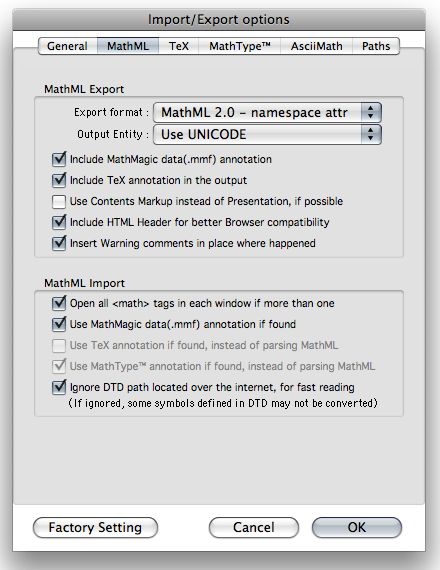
MathMagic File menu - Import/Export Options dialog: MathML settings
We also have a plan to support MathML 3 in the future.
If you are keen to the details and evaluation, please contact MathMagic team for more information.
On the other hand, one of our partners has been using the XML/MathML workflow solution for Adobe InDesign with XML database on a server since 2004. If you need further information please contact us.
Also, we have a separate converter to convert InDesign saved XML + MathMagic equations into XML + MathML format. This Batch conversion also works for HTML + equations to convert to HTML + MathML or other equation formats such as HTML + PNG/JPG/GIF.
Please contact us if you are interested in this Batch conversion solution.
|
|
|
|
|
Does
it support all versions of TeX?
|
|
|
MathMagic supports Plain TeX, LaTeX, AMS-LaTeX, and MediaWIKI TeXvc for mathematical equations and symbols.
Both Mac and Windows versions have mostly the same TeX capatiblity as they are based on the same TeX conversion engine.
MathMagic doesn't support all the features of TeX. It does not support some features related to page layout commands or macros.
Please refer to the User Guide, the section describing TeX that MathMagic supports for the detail TeX compatibility codes.
The list of MathMagic supported LaTeX symbol names are available here.
MathMagic also allows user to type in TeX expressions directly in the editor window, converting it into equation when shift-return entered.
|
|
|
|
Which
versions of QuarkXPress do you support?
|
|
|
MathMagic Pro for QuarkXPress has been discontinued since 2012.
The last version of "MathMagic Pro v8.1 for QuarkXPress" supported QuarkXPress 6.x ~ 9.x on Mac OS X.
On Windows, MathMagic Pro v7.x for QuarkXPress supported QuarkXPress 6.x ~ 9.x as well.
MathMagic XTension English version and MathMagic Pro English version support QuarkXPress & QuarkXPress Passport. MathMagic XTension Japanese & Korean versions support QuarkXPress East Asian versions.
|
|
|
|
Can
I use MathMagic on Windows?
|
|
|
All major MathMagic products are available on Windows as well.
MathMagic Lite, MathMagic Personal Edition, MathMagic Pro Edition for InDesign CS ~ CC (Creative Cloud) 20xx, MathMagic Pro Edition for QuarkXPress 6.x ~ 9.x are available for Windows PC users.
|
|
|
|
Do you have Plug-ins for Adobe InDesign® and InCopy® ?
|
|
|
MathMagic Pro for InDesign is for Adobe InDesign 2.x, CS ~ CS6, and CC ~ CC 20xx. It comes with MathMagic Plug-ins for InDesign CS5 ~ CC by default.
Older Plug-ins may be available separately upon request. For the details about MathMagic Pro Edition,
please refer to the Product page and PDF flyer.
MathMagic Pro Edition for Adobe InDesign is available on both Mac OS X and Windows.
MathMagic InCopy plug-in has been discontinued due to the limited market size of InCopy.
|
|
|
|
How
can I use the equations in other applications?
|
|
|
With MathMagic, you can save or export your work as EPS, PDF, MathML, TeX, LaTeX, GIF, JPEG, TIFF, PICT or WMF format(formats may vary depending on the MathMagic version and OS platform.) Any application that supports one of these formats can read your work.
You may simply drag&drop equations from MathMagic editor window to other application's window, or copy and paste the equation, without going thru the export&export process, because many of modern applications support drag&drop.
|
|
|
|
Can
I adjust the relative location or gap of
each component in the equation?
|
|
|
MathMagic has many options that allow users to specify thier own preferences for many shapes of equations including the locations, gaps, thickness, fonts, size, style, relative locations with a precision over 2300dpi and beyond.
You can also save these settings in a database or StyleSet preference file and use it later with simple switch.
|
|
|
|
Can I use MathMagic in higher education to build very complex equations?
|
|
|
There is no limit to the equations that MathMagic can compose. It can be used equally well with simple equations used in elementary school, and with the most complex equations in the highest levels of academia and industry. It does not discriminate based on correctness of mathematical notation, so you can create your own new math formulation as well. There is no limit to the depth of nested equations, so feel free to build as long or as complex a equation as you can.
|
|
|
|
Does MathMagic support automatic numbering and automatic baseline features for inserted equations in MS Word?
|
|
|
MathMagic does not support automatic numbering of inserted equations in MS Word. But you may put numbers manually by using the "Insert -> Caption..." menu of MS Word.
MathMagic Mac version does work with MS Word's Drag&Drop or Copy&Paste features when you want to insert equations made with MathMagic, but the auto-baseline feature is not working with MS Word on Mac yet.
MathMagic Windows version can work with MS Word by using OLE instead of Drag&Drop or Copy&Paste. When inserted via OLE, the auto-baseline on Windows is supported.
|
|
|
|
Do you support Color in equations?
|
|
|
MathMagic Personal Edition and Pro Editions have supported Color equations since version 4.0 on Mac, and version 2.0 on Windows.
You can apply any color in RGB or CMYK or in Gray. Colors can be manged per document or globally with name and style.
Pro Editions support Over print.
MathMagic supports Spot color as well.
|
|
|
|
Do you support Pantone Colors?
|
|
|
Yes, but with some limitation.
You can manually specify a Pantone Color name and its CMYK value in the Color window, by clicking "New" button to create a Pantone color.
Then, set it as a "Spot" color and assign a Pantone color name in the name field as shown below.
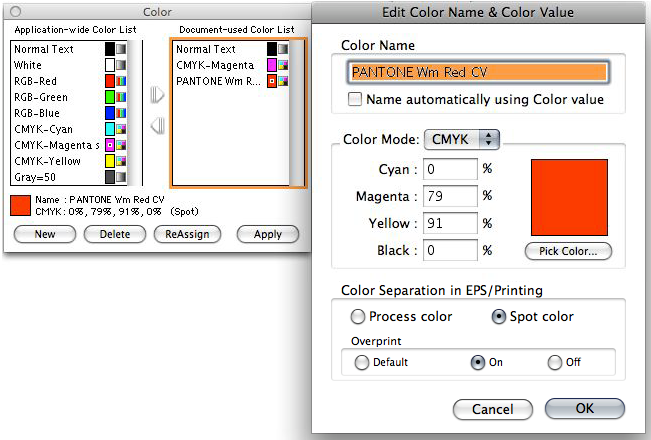
MathMagic Color window and New Color dialog
You can create multiple Pantone color swatchs in the MathMagic Color window - Application-wide Color List.
The current versions do not support any Pantone swatch list yet.
|
|
|
|
How can I convert MS Word equations into MathMagic?
|
|
|
There are many ways to bring your equations from MS Word documents to MathMagic.
If it is just for one ~ several equations, you can select one equation and copy it to the Clipboard from your Word document, then paste it into MathMagic window. Just repeat this Copy & Paste for the rest equations. This will work if the equation was created with MS Word Equation Editor 3.0 or MathType(v4.x ~ 6.x). If the equation was created with the new equation editor introduced in MS Word 2007 or newer.
Or, if you do not have MS Word application to open up the MS Word documents, or if there are too many equations to repeat Copy-Paste in your Word document, or if for multiple Word documents (.doc or .docx), MathMagic has the "Batch conversion" feature for you. Launch MathMagic, select File -> "Convert..." menu item to bring up the following converter window, where you can select MS Word files for input and any output format you'd like to convert to, such as EPS, PDF, JPEG, PNG, GIF, MathML, LaTeX, Wiki equation, Speech text, ... (format varies by platform).
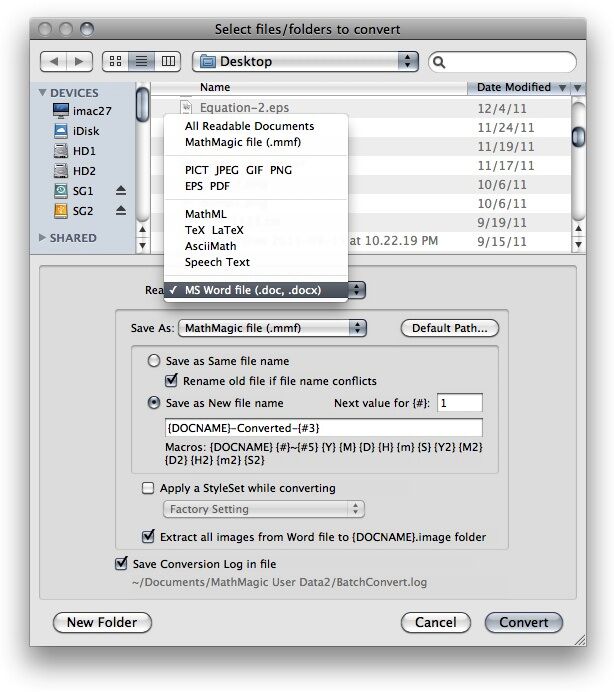

Batch Converter windows (Mac and Win)
You can also check "Extract all images from Word file to ..." Checkbox if you'd like to extract all other images from Word files during the conversion as separate image files.
Please note that this Batch conversion will not work in a Trail version. A valid license is required for the actual conversion.
If you are using Mac OS X, MathMagic Mac version does not support the new equation format created in MS Word 2007 or newer document. In this case, please use MathMagic Windows version.
|
|
|
|
Do you have Multi-user pricing or Site-License Pricing?
|
|
|
Yes, we do.
Please visit here for the details.
If you need more information or your case is not listed here, please contact us.
|
|
|
|
Universal Binary versions for Intel based Macs available?
|
|
|
MathMagic 6.0 or newer is available in Uinversal Binary format which runs nativly on both Intel based and PowerPC based Macintosh computers.
Please note that the latest v8.0x or newer may not come with Universal Binary format but in Intel Binary Only, as the latest Mac OS X does not support PowerPC based computers any more.
|
|
|
|
Are MathMagic Windows versions compatible with Windows Vista, Windows 7 and Windows 8?
|
|
|
Yes, they are.
MathMagic v7.x or newer should run on Windows XP or newer including Vista, 7 and 8.
On Windows 7 or 8, please set the Compatibility mode to "Windows XP SP3", and run as Admin.
If your account does not have enough privilege to access the Registry or your Firewall setting blocks MathMagic Pro from communicating via TCP/IP protocol with MathMagic Plug-ins or XTensions, there might be an error. This can be resolved if you change those Security/Firewall setting or by adjusting your Anti-Virus utility. And also, Windows compatibility mode and Run as an Admin settings may be required.
|
|
|
|
Does MathMagic appliction run on Mac OS X 10.9
Mavericks?
|
|
|
Yes. MathMagic Personal / Lite v8.2 or newer runs on Mac OS X 10.9 Mavericks.
MathMagic Pro v8.7 or newer and its bundled new MathMagic Plug-ins are compatible with Mavericks. (MathMagic Pro v8.6x or older versions do not work on Mavericks as the OpenTransport based communication service is not available on Mavericks any more.)
However, "The app is damaged and can't be opened ..." or similar message may be displayed when launching your MathMagic application depending on the version you downloaded.
If this is the case, please try one of the following options to make it run. This is caused by Gatekeeper security feature included in Mac OS X 10.8 or newer.
Right-click or Control-click MathMagic application and select Open from the contexutal menu.
Or,
Open System Preferences from Apple menu, click "Security & Privacy", select the General tab, and then select 'Anywhere' item for "Allow apps downloaded from:" option, as shown below.
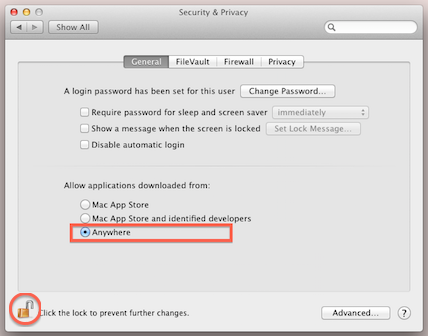
|
|
|
|
|
|

|
Copyright 1998-2026. InfoLogic, Inc. All rights reserved.
[ We proudly develop Quality Products]SM
Contacts
|
|
| |
|
|
|
|
|
|
|
|